Why Your Cables Are Costing You Gigs (And What to Do About It)
You've done the load-in, you're halfway through setup, and the client is hovering. Then it hits you — you can't find the 15-foot XLR you know you packed, the HDMI adapter you need is buried somewhere in a bin of mystery dongles, and the show starts in 45 minutes. Sound familiar?
For a lot of AV folks, this isn't a one-off disaster. It's a pattern. And it doesn't come from being bad at the job — it comes from treating cable management like an afterthought instead of a system. Let's fix that.
The Real Cost of a Messy Cable Situation
It's easy to laugh off a chaotic cable bin as a quirky character trait. "Oh, that's just how my van is." But the downstream effects are anything but funny. When you can't put your hands on the right cable at the right moment, you're not just losing time — you're losing trust.
Clients notice when a setup takes longer than expected. Event coordinators talk to each other. In the AV world, especially in freelance and small-shop environments, your reputation is your marketing budget. One fumbled corporate gig because you couldn't find a working DisplayPort cable can cost you a repeat client worth thousands of dollars a year.
Beyond reputation, there's the financial angle. How many times have you bought a cable on-site at a hotel business center or a Best Buy because you thought you had one but couldn't confirm it? Those $30 panic purchases add up fast, and they're almost always avoidable.
Start With a Full Audit — Yes, Right Now
Before you can build a better system, you need to know what you actually have. Block out a couple of hours on a slow week and dump everything out. Every cable, every adapter, every connector. Lay it all on a table or the floor of your shop.
As you sort, you're looking for a few things:
- Duplicates you didn't know you had — three 6-foot HDMI cables when you thought you had one
- Cables that are damaged or questionable — cuts in the jacket, bent pins, connectors that wiggle
- Mystery items — stuff you can't identify or remember why you own
- Gaps — types or lengths you genuinely need but don't have
Be ruthless about the damaged stuff. A cable that works 90% of the time is a liability on a live show. Toss it or use it strictly for rehearsals and testing at home.
Build a Catalog That You'll Actually Use
Here's where a lot of people overcomplicate things. You don't need specialized software or a fancy database to track your cables. You need something you'll actually open and update.
A simple Google Sheet works great for most solo operators and small crews. Set up columns for cable type, connector ends, length, quantity, condition, and storage location. If you want to go a step further, add a "last verified" column so you know when you last physically confirmed that item was in your kit.
For shops with multiple techs pulling from shared inventory, a shared spreadsheet with edit permissions becomes even more valuable. Everyone can check what's available before a job, and everyone is responsible for updating it when something gets used, damaged, or goes missing.
Some folks prefer dedicated inventory apps — tools like Sortly or even a simple Notion database work well if that's more your style. The platform matters less than the habit of keeping it current.
Label Everything, No Exceptions
Labeling is the step most people skip because it feels tedious, and then they regret it immediately when they're on-site trying to trace a cable run in a dark room. Invest in a decent label maker — a Brother P-touch is a solid workhorse that most AV pros swear by — and build labeling into your post-gig wrap routine.
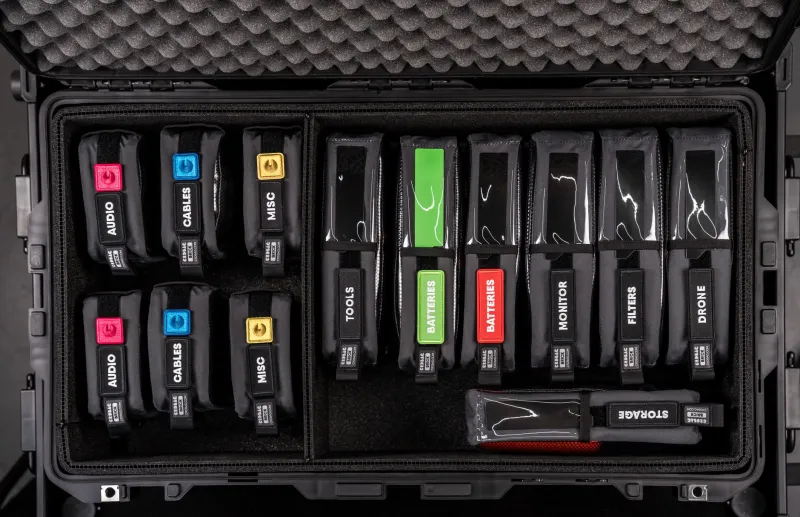
For cables, label both ends. Include the type, length, and if it's part of a specific kit, a color code or kit number. Color-coded electrical tape is a fast alternative if you're labeling in bulk — one color for audio, another for video, another for power extensions, and so on.
For adapters and small connectors, a small parts organizer with labeled compartments does the job. These are cheap at any hardware store and they stack neatly in a road case or bin.
The Pre-Job Checklist Is Your Best Friend
Once your inventory is cataloged and labeled, the next piece is building a pre-job pull process. Before every gig, you should be working from a specific list — not just grabbing what "feels right" from the bin.
Start with the job specs: What's the room? What's the signal chain? What are the display types? What does the client need to connect? From there, build a pull list that accounts for every connection in that chain, plus backups for anything that's a single point of failure.
A good rule of thumb: bring two of anything that would end the show if it failed. That means two of your most-used HDMI lengths, a backup audio snake, a spare set of adapters. The weight and space cost of redundancy is almost always worth it.
After you pull everything for a job, do a physical check against the list. Check it off. Don't trust your memory — your memory will absolutely tell you the 25-foot XLR is in there when it's sitting on your workbench at home.
Post-Gig Habits That Actually Stick
The system only works if you close the loop after every job. That means wrapping cables properly (over-under if you're not already doing it — your cables will last dramatically longer), returning everything to its designated spot, and updating your inventory if anything was lost, damaged, or consumed.
Building a 15-minute "close-out" routine after load-out keeps the chaos from creeping back in. It feels like extra work in the moment, especially after a long show day, but it's the difference between a system that holds and one that slowly collapses back into the cable bin of despair.
The Bottom Line
Cable organization isn't glamorous. Nobody's going to Instagram your perfectly labeled XLR collection. But the AV pros who build tight inventory habits are the ones who show up confident, set up fast, and leave clients with the impression that everything went exactly as planned — because it did.
That reputation compounds over time. And it starts with knowing exactly what's in your kit before you ever leave the driveway.